
Have you ever opened a website and felt like it was taking forever to show something on the screen? It can be very annoying, especially when you know the website is fast or the hosting is strong. Many people think the problem is with their internet or their web host. But in many cases, the real problem is something else. It is the DNS lookup, which is one of the first steps before any website starts loading.
DNS lookup is a small step, but it decides how fast the website will open. If this step is slow, everything after it becomes slow too. This is why it is so important to learn how to speed up DNS lookup. When DNS is fast, your website loads quickly, feels smooth, and gives a better experience to your users.
You will learn what DNS is, how DNS lookup works, and why slow DNS can make even strong websites feel slow. You will also learn how to check your DNS speed and what you can do to fix it.
What Is DNS
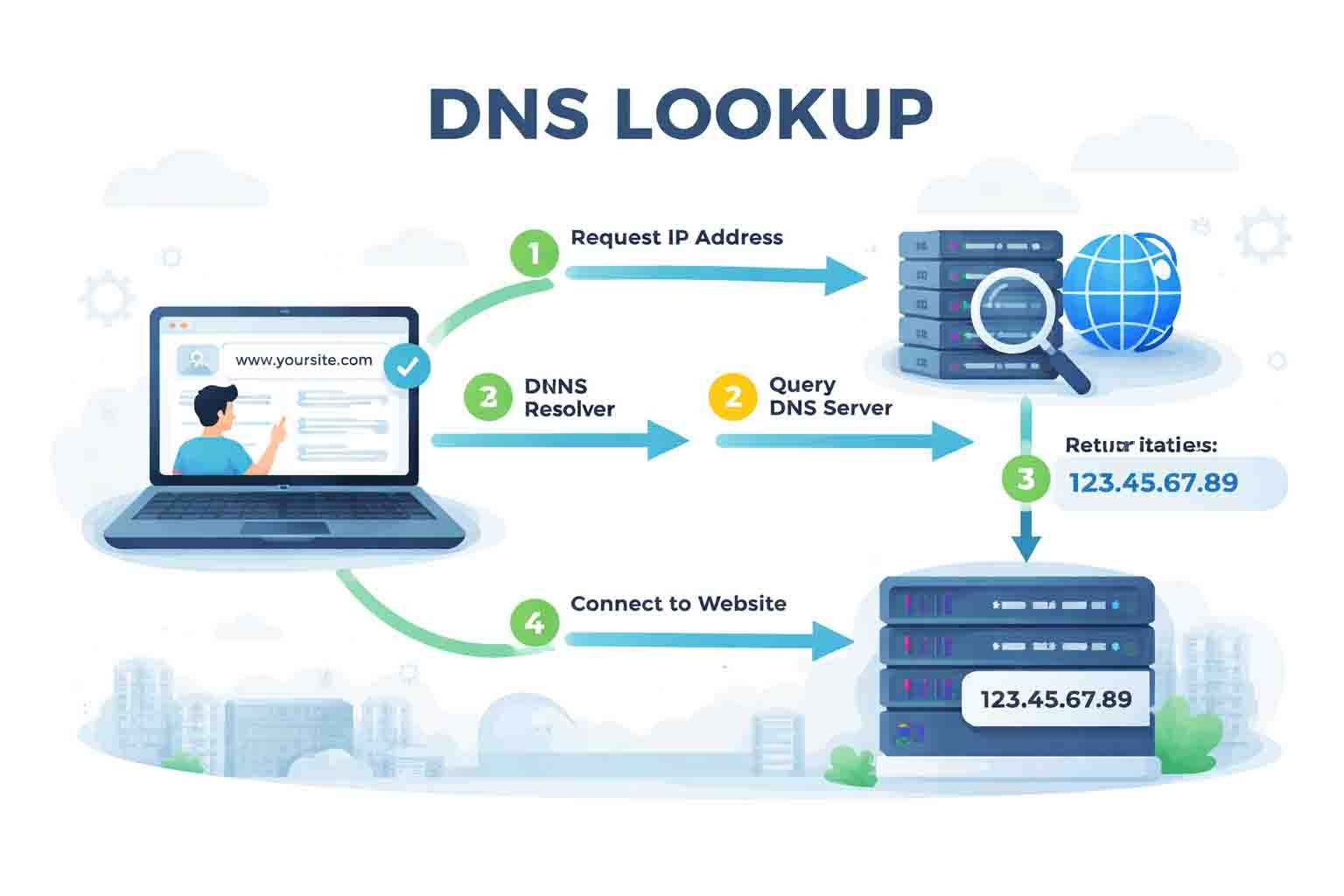
DNS stands for Domain Name System. The easiest way to understand it is to think of it like a phonebook. When you want to call someone, you look up their name and find their number. DNS does the same thing, but for websites. When you type a website name like example.com, DNS changes that name into a number called an IP address.
Your browser cannot understand names as we do. It only understands numbers. So every time you open a website, your computer must first ask the DNS, “What is the number for this website?” Only after getting the number can the browser open the website. This is why DNS is so important, because nothing loads until this step is finished.
DNS works quietly in the background. You do not see it, but it is active every time you open a page or click a link. If DNS works fast, you will not even notice it. But if DNS is slow, the page will take longer to start loading. This delay can make your website feel slow, even if your hosting is fast.
Features of DNS Lookup
1. DNS Caching
DNS caching helps speed up repeated visits. When you visit a website for the first time, your system stores the DNS information. So the next time you open the same website, your computer does not need to ask the DNS again. This makes things faster and smoother. But if the cache becomes old or wrong, it can slow things down.
2. Recursive Resolution
Sometimes DNS needs to ask other servers before it gets the correct answer. This is called recursive resolution. If these extra steps take time, your lookup becomes slower. It is like asking several people for directions before finding the right place.
3. Authoritative DNS Server
This is the final source of truth for a domain. When DNS reaches the authoritative server, it gets the correct IP address for the website. If this server is slow or overloaded, your DNS lookup will also be slow. Many cheap domain services have slow authoritative DNS servers.
4. TTL (Time to Live)
TTL tells how long DNS information should stay saved in the cache. If TTL is too low, your browser keeps asking the DNS again and again. If TTL is too high, the information may become outdated. Finding the right balance helps keep DNS lookup fast.
5. Anycast Routing
Modern DNS providers use Anycast, which means they have many DNS servers around the world. When you request DNS, the closest server answers you. This makes DNS lookup much faster, especially for global visitors. This is one of the reasons fast DNS providers perform so well.
6. DNS Security (DNSSEC)
DNSSEC adds extra security to DNS. It helps protect websites from fake DNS responses. But sometimes it can make DNS slightly slower. Still, the added security is often worth it, especially for important websites.
What Is DNS Lookup Time
DNS lookup time is the time it takes for your computer to ask the DNS for the website’s IP address and get the answer back. This is one of the first steps in loading a website. If this part is slow, the whole website will feel slow.
Chrome DevTools shows the time very clearly. If the DNS lookup is under 50ms, that is excellent. If it is between 50ms and 100ms, that is okay. If it is between 100ms and 200ms, it is a warning sign. Anything above 200ms means something is wrong and needs to be fixed. This small number plays a big role in site speed.
DNS lookup time may seem tiny, but it matters a lot. Even a 200ms delay can slow down your entire page. This delay adds up when your website loads many files, uses many domains, or loads third-party scripts. This is why learning how to speed up DNS lookup is so helpful for website performance.
How Slow DNS Makes Your Website Slow
When DNS lookup is slow, the browser has to wait. Nothing else can start. Your server cannot respond, no images can load, and no code can run. The page just sits there waiting for the DNS to give the correct IP address. This delay makes your website feel slow from the very first moment.
A slow DNS lookup also increases your Time to First Byte (TTFB), which is an important part of Core Web Vitals. Search engines like Google care a lot about how fast your website loads. If DNS is slow, people may leave your site before it even shows anything. This leads to higher bounce rates and lower ranking.
Slow DNS is a hidden problem because you cannot see it with your eyes. But your users feel it every time they open your site. Fixing DNS lookup mistakes can make your website load faster instantly, without changing your hosting or code.
Main Reasons DNS Lookup Gets Slow
One common reason is using a slow DNS provider. Many people use the default DNS from their internet provider, which is often slow. These DNS servers get overloaded during busy times, which increases lookup time. Switching to a faster DNS can help reduce this problem.
Another reason is distance. If your DNS server is far away from your location, it will take more time for the request to travel and return. This becomes a bigger issue for global audiences where users are in different countries.
DNS can also get slow because of incorrect settings. A wrong DNS record, wrong TTL value, or a missed configuration can create delays. Malware can also change DNS settings and cause slow or fake responses. And if your website loads many files from different domains, each one needs its own DNS lookup, which slows things down even more.
How to Check Your DNS Speed
You can check your DNS speed in many simple ways. One easy method is using Chrome DevTools. When you open your website and press F12, you can see the DNS lookup time in the Network tab. This tells you exactly how long the DNS step is taking.
You can also use online tools that show DNS performance. These tools compare your DNS lookup with other servers and show if your DNS is slow. Another easy method is using the command line. For example, typing nslookup followed by your domain shows how long it takes to resolve your IP. These methods help you understand if DNS is the real reason behind slow loading.
Switch to a Faster DNS Provider
One of the best ways to learn how to speed up DNS lookup is by switching to a faster DNS provider. Good DNS providers have strong networks and many servers around the world. This means your DNS request will reach the nearest server and return quickly.
Some popular fast DNS providers include Cloudflare, Google Public DNS, Amazon Route 53, and Quad9. These providers use Anycast routing, which helps reduce DNS lookup time for users everywhere. Switching to one of these providers is easy and can improve speed in just a few minutes.
Turn On DNS Caching for Faster Loading
DNS caching helps the browser remember DNS information so it does not need to ask the DNS provider every time. This is helpful for returning visitors because the page opens faster when the DNS lookup is already saved.
Caching happens at many levels. Your browser has a cache, your device has a cache, and even your server or CDN may store DNS information. When all these work together, your website loads faster and feels smoother. Flushing the cache can also help when old information slows things down.
Fix DNS TTL Values the Right Way
TTL, also known as Time to Live, tells how long your DNS information should stay saved in the cache. If TTL is too low, your browser has to look up the DNS again and again. This can make DNS lookup slower and cause small delays every time the website loads. A higher TTL keeps your DNS record saved for a longer time, which helps returning users see your website faster.
Finding the right TTL value is important because it helps your site stay fast but also flexible when changes are needed. If you change your hosting or move your server, you need a lower TTL so the new DNS settings update quickly. But after the change, you should set it back to a higher TTL for better speed and stable performance.
Using a balanced TTL is one of the easiest ways to learn how to speed up DNS lookup without doing anything complex. A simple change in TTL settings can make your DNS more reliable and reduce unnecessary lookups. This helps both new visitors and returning visitors enjoy faster loading times.
Reduce DNS Lookups on Your Website
Every time your website loads something from a different domain, your browser has to do another DNS lookup. This happens with ads, analytics, fonts, images, widgets, and many other files. If your site uses too many different domains, these lookups stack up and make the entire page slower.
One way to fix this is to reduce the number of third-party scripts on your site. For example, if you use many tracking tools, try removing the ones you do not need. You can also host fonts locally instead of pulling them from external sites. This can save time and helps make pages load more smoothly without extra lookups.
You can check how many DNS requests your website makes by using Chrome DevTools or a speed testing tool. This gives you a clear idea of what to keep and what to remove. Reducing these extra lookups is a very simple and effective step, especially for people learning how to speed up DNS lookup for better website performance.
Use a CDN to Speed Up DNS and Content
A CDN, or Content Delivery Network, can help speed up DNS lookup by serving your content and DNS information from servers close to your visitors. This reduces the distance the DNS request has to travel. When the DNS response comes from a location near the user, the entire website opens much faster in their browser.
CDNs also offer built-in caching and DNS tools that make things even smoother. They store parts of your website in different places around the world. So when someone visits your site, the content loads from the nearest server instead of coming from a single far-away location. This can greatly improve speed for global audiences.
Using a CDN is one of the strongest steps if you want to learn how to speed up DNS lookup in a modern and simple way. Services like Cloudflare, Fastly, and Akamai make it very easy to set up. Even beginners can activate a CDN with a few clicks and enjoy faster loading on all devices.
Check and Fix DNS Issues Regularly
DNS problems can appear over time, so checking your DNS regularly keeps your website healthy and fast. Speed tools like GTmetrix, Pingdom, or WebPageTest can show you if your DNS lookup time is increasing. If you notice a higher number than before, that is a good sign to check your DNS provider or settings.
Sometimes outdated DNS records or unused subdomains can slow things down. Cleaning these old records helps keep your DNS fast and stable. It is similar to cleaning your phone or computer when it becomes slow. Removing extra items makes everything feel fresh again and helps your visitors load pages quickly.
Keeping your DNS safe is also important. Malware can change DNS settings without you knowing. Using secure DNS providers and checking your domain settings helps prevent this. Regular checks give you confidence that your site is running smoothly and your visitors enjoy a fast and safe experience.
Extra Tips for WordPress Users
WordPress websites often use many plugins, and some of them load files from different domains. This means more DNS lookups. Removing unnecessary plugins is one easy way to make your site lighter and faster. Using well-built themes can also reduce the number of external files your website needs.
Another helpful tip is hosting Google Fonts locally. Many WordPress themes load fonts from Google servers, which adds extra DNS lookups. When you store the fonts directly on your website, the browser can load them faster without doing extra work. This is a simple change but can make a big difference.
Caching plugins can also help. They save parts of your website so visitors do not have to wait for everything to load from scratch. Some caching tools even help reduce external requests, making DNS lookups faster. These small changes are very effective for people who want to learn how to speed up DNS lookup on WordPress.
Benefits of DNS Lookup
1. Faster Website Loading
A fast DNS lookup helps your website connect to the server quickly. This means your pages start loading right away without delay. A simple improvement in DNS lookup can make your whole site feel much faster and more responsive for every visitor.
2. Better User Experience
People do not like waiting for slow websites. When DNS lookup is fast, users see your content sooner and enjoy smoother browsing. This can make them stay longer on your website and explore more pages without frustration.
3. Improved SEO
Search engines care about speed, especially in 2026 when user experience is very important. A faster DNS lookup improves your Core Web Vitals and helps your pages perform better in search results. Better speed can help you get more visitors and higher rankings.
4. More Reliable Browsing
A good DNS system helps reduce errors and connection failures. Visitors are less likely to see “site cannot be reached” messages. This makes your website more stable and builds trust with your audience.
5. Better Security
Some DNS providers offer extra security features like DNS filtering and DNSSEC. These tools protect your site from fake responses and harmful attacks. This gives your visitors a safer browsing experience and protects your website from risks.
Alternative to DNS lookup
1. Use Only Trusted DNS Providers
You should always use DNS providers that are safe, legal, and trusted worldwide. Cloudflare, Google DNS, Amazon Route 53, and Quad9 are great options for fast and safe DNS.
2. Avoid Illegal DNS Bypass Tools
Some tools claim to make browsing faster by bypassing DNS restrictions. These tools are unsafe and can harm your privacy. It is always better to use legal and trusted DNS options.
3. Follow ISP and Country Rules
Using DNS correctly means staying within your country’s internet rules. This helps keep your browsing safe and legal. Trusted DNS providers follow these rules and give stable performance.
4. Use DNSSEC for Extra Safety
DNSSEC adds extra protection by verifying DNS responses. It helps stop attackers from sending fake information. This is a smart option if you want better safety without slowing down too much.
Final Thoughts
DNS lookup may seem like a small step, but it plays a very big role in how fast your website opens. When you learn how to speed up DNS lookup, you make your website feel smoother, faster, and easier to use. Small changes like switching DNS providers, reducing lookups, and fixing TTL values can give you instant speed improvements.
Checking your DNS often and keeping your settings clean helps your website stay fast in the long run. Visitors enjoy quick loading, search engines reward you with better ranking, and your site becomes more reliable. With these simple steps, you can improve your website speed without stress or complex work.
FAQs
Why is my DNS lookup slow?
DNS lookup becomes slow when the DNS provider is weak, the server is far from you, or your website loads many files from different domains. Wrong DNS settings can also cause delays.
How can I speed up DNS lookup quickly?
The fastest way is to switch to a better DNS provider like Cloudflare or Google DNS. This simple change often reduces DNS time in just a few minutes.
Does DNS caching help improve website speed?
Yes. DNS caching saves DNS information so your device does not need to look it up again. This makes the website load much faster for returning visitors.
What is a good DNS lookup time?
Under 50ms is excellent. Between 50ms and 100ms is acceptable. Anything above 200ms is slow and should be fixed to improve speed.
Can too many plugins slow down DNS lookup?
Yes. Plugins that load files from other domains can cause extra DNS lookups. Removing unnecessary plugins helps reduce lookups and speed up your website.
You may also read:
FintechZoom.io Explained: The Financial Tool Everyone’s Talking About
Why Classroom 15X Is Changing the Future of Education
Core App Dashboard: The Smart Way to See All Your Data in One Place