
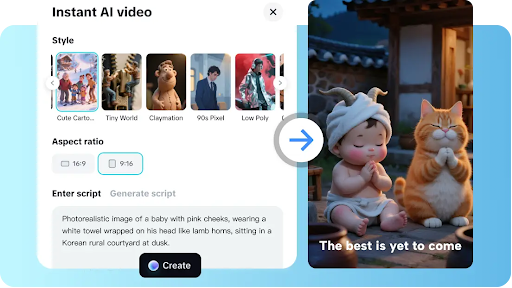
In today’s digital age, videos have become one of the most effective ways to communicate, promote, and entertain. Whether you’re creating content for social media, marketing campaigns, or personal projects, having the right tools and understanding the fundamentals of video production can make a huge difference. Two essential components of this process are selecting a capable video maker and developing solid video editing skills. In this guide, we’ll explore both aspects, helping beginners and professionals alike achieve polished, engaging videos.
Understanding the role of a video maker
A video maker is a software or platform that allows users to create videos from scratch or by using pre-made templates. These tools simplify the complex process of video creation by offering features such as:
- Drag-and-drop interfaces
- Stock media libraries (images, video clips, and audio)
- Ready-made transitions and effects
- Text overlays and animations
The primary advantage of a modern video maker is that it enables anyone, even without professional experience, to produce high-quality content quickly. For example, entrepreneurs can create promotional clips for products, teachers can design educational videos, and hobbyists can make personal projects that look professional.
When choosing a video maker, consider factors such as ease of use, the variety of templates, the ability to export in high resolution, and support for different platforms. Some tools are cloud-based, allowing access from multiple devices, while others are software programs installed on a computer. Each option has its pros and cons, depending on your needs.
Key features to look for in a video maker
Not all video makers are created equal, and selecting the right one requires understanding which features are essential for your projects. Here are the most important aspects to consider:
User friendly interface
For beginners, a cluttered or complicated interface can be overwhelming. Look for software that offers an intuitive design, clear menus, and simple navigation. Features such as drag-and-drop timelines and prebuilt templates can significantly reduce the learning curve.
Versatility in media support
A good video maker should support multiple formats for video, audio, and images. This ensures that you can incorporate different types of content into your videos without conversion hassles. Additionally, access to royalty-free stock libraries can save time and enhance creativity.
Advanced editing capabilities
While basic video creation might require just trimming and adding effects, more advanced projects demand features such as layering, keyframing, color grading, and motion graphics. A versatile video maker should offer these functions without overwhelming the user.
Export options and sharing
Consider whether the video maker provides flexible export options, including different resolutions, aspect ratios, and file formats. Integration with social media platforms or cloud storage can also streamline the sharing process, making it easier to publish content directly.
Video editing: bringing creativity to life
While a video maker lays the foundation for your project, video editing is where creativity truly shines. Editing allows you to arrange footage, enhance visuals, add music, and create a cohesive narrative. Even the most sophisticated video maker can’t replace the storytelling and artistic decisions that come from thoughtful editing.
The essentials of video editing
Successful video editing requires understanding some fundamental principles:
- Storytelling: Every video should have a clear structure. This could be as simple as beginning, middle, and end, or more complex, depending on your project.
- Pacing: The rhythm of your video affects how the audience perceives it. Rapid cuts create energy and excitement, while longer shots convey calm or reflection.
- Transitions: Smooth transitions between clips prevent the video from feeling disjointed. They can be simple cuts, fades, or more elaborate effects depending on the tone you want.
- Audio: Sound is just as important as visuals. Clear narration, balanced background music, and well-placed sound effects enhance engagement and comprehension.
- Color grading: Adjusting color tones can dramatically alter the mood of your video. It can make footage appear warmer, cooler, or more cinematic.
Tips for effective video editing
- Plan your edits: Before diving into editing, create a storyboard or outline. Knowing what shots you need and the sequence they’ll appear in saves time and prevents unnecessary rework.
- Keep it concise: Avoid long, drawn-out sequences unless it serves a creative purpose. Viewers tend to lose interest if a video feels too slow.
- Use layers wisely: Combining video, text, effects, and audio layers can add depth to your project. However, too many layers may clutter the screen, so balance is key.
- Pay attention to audio: Poor audio quality can ruin an otherwise excellent video. Make sure background music doesn’t overpower dialogue or narration.
- Review and revise: Editing is an iterative process. Take breaks and return with fresh eyes to spot inconsistencies or areas for improvement.
Combining video maker tools and editing skills
The real magic happens when you combine a capable video maker with strong video editing skills. Even a beginner can produce professional-looking videos by leveraging templates and intuitive interfaces, then refining their work with thoughtful edits. For instance, a small business owner might start with a template for a product demo, customize colors and text, and then use editing techniques to adjust pacing and audio for maximum impact.
Common mistakes to avoid
Even with the best tools, beginners often make avoidable mistakes:
- Overloading with effects: Too many filters, transitions, or animations can distract from the main message.
- Ignoring audio levels: Failing to balance sound can make your video hard to watch or listen to.
- Skipping the storyboard: Jumping straight into editing without a plan can lead to a disorganized final product.
- Neglecting aspect ratios: Videos intended for social media may require different dimensions. Check these before exporting.
Avoiding these errors ensures that your content is professional, engaging, and easy to consume.
Choosing the right tool for your needs
When it comes to selecting a video maker, the best choice depends on your goals, budget, and skill level:
- Beginners: Cloud-based, template-driven platforms are ideal. They offer simplicity and speed without sacrificing quality.
- Intermediate users: Software with more advanced editing tools, such as layering, keyframing, and color grading, allows greater creative control.
- Professionals: High-end video makers with comprehensive editing suites, support for 4K or higher resolution, and advanced effects are suitable for filmmakers and content creators aiming for cinematic quality.
Remember, the tool is only as effective as the person using it. Even the most powerful software can’t replace careful planning, creativity, and an understanding of editing fundamentals.
Final thoughts
The combination of a reliable video maker and strong video editing skills empowers anyone to create compelling visual content. By understanding your needs, exploring different tools, and dedicating time to develop editing techniques, you can transform simple footage into polished, engaging videos. Whether your goal is to entertain, educate, or promote, these skills are invaluable in today’s digital world.
Video creation is both an art and a science. While technology provides the tools, the creativity, planning, and attention to detail define the final product. Investing in learning and practicing these skills ensures that your videos will stand out, communicate effectively, and resonate with your audience.
