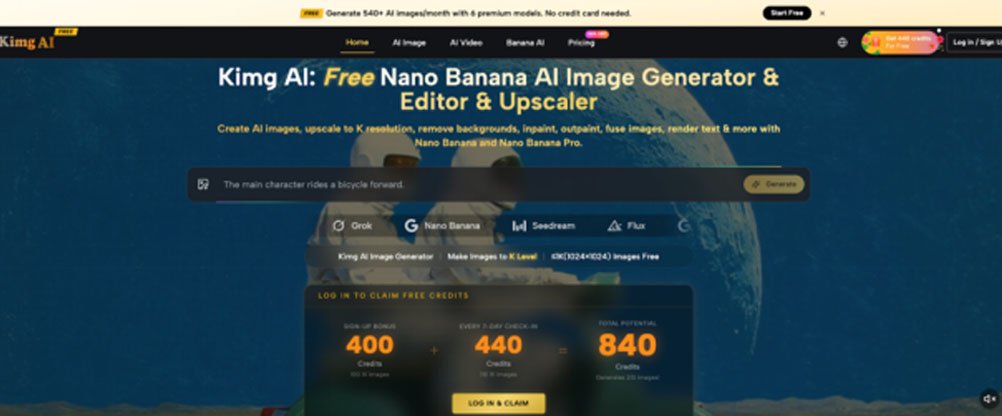
Most “free” AI image tools share one quiet frustration: you get three images, maybe five, and then a paywall appears. That’s barely enough to test whether a model suits your style — let alone explore something like Nano Banana AI, which is only accessible on premium tiers elsewhere. Kimg AI changes that equation entirely, and the numbers are worth paying attention to.
I. The Real Problem with “Free” AI Image Generators
- Free tiers are designed to disappoint.Almost every major AI image tool advertises a free option. In practice, that usually means a handful of low-res outputs before you’re pushed toward a subscription.
- Most people never get to experience the best models.Premium models like GPT Image or Nano Banana are locked behind paywalls on most platforms. Curious users — especially students or hobbyists — never get a real chance to see what these models can actually do.
- Credit card requirements create a trust barrier.Even “free trials” often require billing information upfront. That friction alone stops a large portion of potential users before they generate a single image.
II. What Kimg AI Actually Offers New Users
Kimg AI doesn’t bury its free benefits in fine print. The homepage is upfront about two specific bonuses that stack together into something genuinely useful.
- Sign-up bonus: 400 credits on registration.No credit card. No trial period. Create an account and the credits appear immediately.
- Weekly check-in reward: 440 credits for 7 consecutive days.Log in daily for a week and collect an additional 440 credits. Combined with the sign-up bonus, that’s 840 credits before spending anything.
- That translates to 210+ image generations with premium models.Using those combined credits on models like Banana AI, users can generate well over 200 images. After that initial week, the weekly check-in continues — so ongoing free usage stays available to anyone who logs in consistently.
III. Which Models Are Actually Available
One thing that sets Kimg AI apart from single-model tools is the range of options accessible from one interface. Switching between models doesn’t require different accounts or subscriptions.
- Nano Banana and Nano Banana Pro. Nano Banana is a standout on the platform. The standard version supports up to 4 reference image uploads, while Nano Banana Pro expands that to 8 — giving users more control over visual consistency and style transfer. Banana AI’s strength lies in how well it handles detailed prompts and reference-guided generation.
- Seedream, Flux, and other top-tier options.The model library covers a wide spread of styles and use cases. Flux handles photorealistic outputs well, while Seedream leans into artistic and stylized results.
- GPT Image and Grok Image for text-driven generation.Both models are known for following complex prompts with strong accuracy. For users who want precise outputs from descriptive text, these are worth testing directly inside Kimg AI.
IV. Output Quality: What Free Users Can Expect
- Free generations output at 1K resolution.1K is fully usable for social media, web content, concept work, and most personal projects. It’s not a downgraded preview — it’s a complete, usable image.
- 4K resolution is available for members.Users who choose to upgrade can select 4K output for print-quality or high-detail work. But for testing models and building a workflow, 1K covers the essentials.
- Quality varies by model — which is exactly why having multiple options matters.Testing the same prompt across Nano Banana Pro, Flux, and GPT Image inside Kimg AI gives a direct, side-by-side sense of each model’s strengths without any guesswork.
V. Going Beyond Images: The Video Generation Option
- Kimg AI includes video models alongside its image tools.This isn’t a separate product or a different subscription tier — video generation is part of the same interface.
- Images can be converted to video using Veo 3.After generating an image, users can pass it directly into the Veo 3 video model. The same credits used for image generation apply here, meaning free credits can also cover video creation.
- This makes Kimg AI a more complete creative tool.For anyone experimenting with AI content — not just static images — having image-to-video in the same workflow saves significant time and avoids the hassle of exporting between platforms.
VI. A Practical Walkthrough: Getting the Most from Free Credits
- Start with a focused test.Pick one subject or style and generate it across two or three different models. This reveals how each model interprets similar inputs — far more useful than random experimentation.
- Use Nano Banana Pro’s reference image feature deliberately.Upload 2–3 reference images that share a consistent color palette or lighting style. The model responds well to coherent visual references, and the results are noticeably more on-target than prompt-only generation.
- Save check-in days for heavier sessions.Rather than spending weekly credits across seven small sessions, some users find it more productive to batch their generations — running larger prompts on days when there’s more time to review and iterate.
Conclusion
The gap between “free” and “actually usable” is where most AI tools lose people. Kimg AI closes that gap with a credit system that gives new users genuine access — not a demo, not a watermarked preview, but hundreds of full generations across some of the most capable models available today. For anyone curious about Nano Banana, GPT Image, or Veo 3 video conversion, this is a low-friction way to find out what these tools can actually do before committing to anything.