
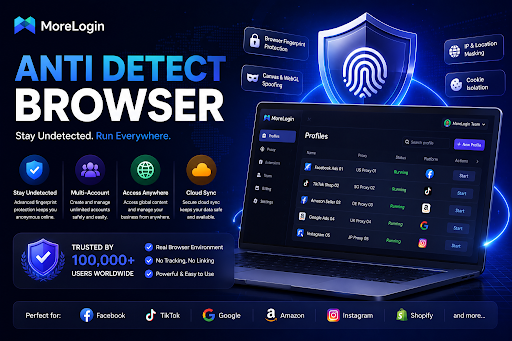
Anti detect browsers have become an important tool for multi-account workflows. The right anti detect browser helps users create separate browser profiles, manage proxies, control fingerprint settings, organize accounts, and work with teams more safely.
That is why managing multiple online accounts is no longer as simple as opening different browser windows. Platforms now look at cookies, IP addresses, browser fingerprints, device signals, session patterns, and environment consistency. For agencies, e-commerce sellers, affiliate teams, ad operators, and account managers, a normal browser often cannot provide enough separation or control.
But not every tool is built for the same type of user. Some are better for solo operators. Some are stronger for agencies. Some focus on automation, while others focus on simple profile management. This guide compares 10 popular anti detect browsers in 2026 and explains which one may fit different workflows.
What Is an Anti Detect Browser?
An anti detect browser is a browser designed to create separate browsing environments for different accounts, projects, clients, or workflows. Each profile can have its own cookies, local storage, proxy settings, login state, user agent, and browser fingerprint-related parameters.
In practice, this means users can manage multiple accounts in more organized and isolated environments instead of mixing everything in one standard browser.
A regular browser may let users create different profiles, but it is not built for large-scale account management. It usually lacks advanced fingerprint control, proxy matching, team permissions, batch operations, and automation support. These tools also manage browser parameters such as browser version, operating system, screen resolution, and screen size to form a stable digital fingerprint. An anti detect browser is designed for users who need more structure and more control for anti detection.
How to Choose the Best Anti Detect Browser
Before comparing tools, it is important to understand what makes an anti detect browser worth using. A strong product should not only create profiles but also support managing multiple browser profiles efficiently, including bulk profile creation where needed. It should also support stable daily operations.
| Criteria | Why It Matters |
| Fingerprint Quality | Browser profiles should look stable and consistent, not random or poorly matched. |
| Profile Isolation | Cookies, sessions, storage, and account data should stay separated between profiles so platforms are less likely to treat accounts as the same person. |
| Proxy Support | Users should be able to assign and manage proxies at the profile level. |
| Ease of Use | A clean interface matters when teams manage many profiles every day. |
| Team Collaboration | Agencies and teams need profile sharing, permissions, access control, and cloud sync. |
| Automation Support | Synchronization, rest api access, and automation features help larger workflows scale by handling browser actions and repetitive tasks. |
| Pricing and Scalability | Look for a free plan, free tier, free version, or free trial version if you want to test the tool first, but note that paid plans usually unlock advanced features as profile volume and team size grow. |
| Long-Term Workflow Fit | The browser should be practical for repeated daily work, not just a quick test. |
Based on these criteria, here are the 10 best anti detect browsers to consider in 2026, including some of the best antidetect browsers on the market.
1. MoreLogin — Best Overall Anti Detect Browser

MoreLogin ranks first because it offers the strongest overall balance for real multi-account operations, making it an advanced solution rather than just a basic profile tool. It is closer to a workspace for managing separate browser environments, proxies, account sessions, team access, and repeated workflows.
For users who only need one or two profiles, many tools can work. But when the workflow becomes larger, the difference becomes clearer. Teams need profile organization, proxy consistency, permission control, and automation options. MoreLogin is strong because it brings these parts together without making the daily workflow feel too heavy.
With MoreLogin, users can create isolated browser profiles and multiple browser profiles for different accounts, clients, projects, or regions. Each profile can keep its own cookies, storage, proxy settings, fingerprint parameters, and login state. This helps teams avoid mixing account environments and makes long-term profile management easier.
MoreLogin is also a strong choice for team-based work. Agencies, e-commerce teams, affiliate teams, and account operators often need to assign profiles to members, control access, and protect account assets. MoreLogin supports this kind of workflow better than many tools that are mainly built for individual users.
Another important advantage is automation. MoreLogin supports batch operations through Synchronizer and more advanced workflows through Local API. This matters for users who need to create, launch, stop, or manage browser profiles at scale, especially for multi accounting.
For readers who want to explore the product directly, MoreLogin’s anti detect browser page explains how it supports profile isolation, fingerprint management, proxy setup, and multi-account workflows.
Why MoreLogin Ranks First
- Strong browser profile isolation
- Practical fingerprint and proxy management
- Clean workflow for daily multi-account operations
- Team permissions and profile sharing
- Synchronizer for batch actions
- Local API support for automation
- Good fit for both solo users and growing teams
- Strong value for long-term business use
Best For
MoreLogin is best for agencies, e-commerce sellers, affiliate marketers, social media operators managing social media accounts, ad teams handling ad accounts, and businesses that need a stable multi-account workspace.
What to Consider
Like most anti detect browsers, MoreLogin still requires users to set up profiles, proxies, and account environments carefully, including choosing the right proxy server for each use case and avoiding free proxies for serious work. Proxy traffic limits can also matter when scaling profile usage. Users who are completely new to this category may need some time to understand how profile settings, fingerprints, and proxies work together.

2. Multilogin — Best Established Premium Option
Multilogin remains one of the most recognized names in the anti detect browser market. It has been in the category for a long time and is often one of the first tools experienced users mention.
Its main strength is reputation. Many users already know the brand, and that gives it strong credibility in high-intent comparisons. For buyers who prefer established tools and are comfortable with premium positioning, Multilogin can still be a serious option.
Multilogin is especially relevant for users who value market history and want a tool with long-standing visibility. It has built a strong name in the anti detect browser space, and that still matters in 2026.
However, brand recognition alone does not automatically make a tool the best choice for every user. Buyers increasingly compare even established tools against broader anti detection browser options based on daily usability, workflow fit, and overall value.
Why It Ranks Second
- Strong brand recognition
- Long-standing presence in the market
- Premium positioning
- Familiar name for experienced users
- Still relevant for serious buyers
Best For
Multilogin is best for users who prefer an established premium brand and are willing to evaluate it as part of a higher-end workflow.
What to Consider
Users should compare the full cost, usability, and team workflow before choosing it. A well-known brand is useful, but the final decision should still depend on daily operational fit.
3. AdsPower — Best Feature-Heavy Option

AdsPower is another major name in the anti detect browser space. It is widely discussed and often appears in comparison lists because it offers a broad set of features for account and profile management, which appeals to users managing multiple profiles in one platform.
Its biggest strength is feature coverage. Users who want many tools, settings, and workflow options in one place may find AdsPower attractive. It can be a practical option for users who are comfortable with a more feature-dense interface.
AdsPower is often considered by e-commerce sellers, social media managers, and teams that want many profile management options, especially users who need unlimited profiles or at least very high profile volume for heavier operations. It has strong visibility and is easy to find when researching anti detect browsers.
The tradeoff is that feature-heavy products can feel busy. A tool with many options is not always the easiest tool to use every day. For some teams, too many controls can slow down onboarding and profile management.
Why It Ranks Third
- Broad feature set
- Strong market visibility
- Good fit for users who want many controls
- Commonly used in multi-account discussions
- Useful for advanced profile management needs
What to Consider
Teams that care most about clean workflow and simple daily operation may want to compare it carefully with more balanced options.
4. GoLogin — Best Accessible Mainstream Option
GoLogin is one of the most accessible names in the anti detect browser market. Many new users discover it early because its positioning is easy to understand.
Its main advantage is simplicity at the research stage. Users can quickly understand what the product does and why it belongs in the anti detect browser category. This makes GoLogin a common choice for people creating their first shortlist.
GoLogin can be a good entry point for users who want to explore browser profile management without starting with the most complex product. It is recognizable, easy to place in comparison content, and relevant for many basic multi-account workflows.
However, when users compare tools more deeply, they may need to look beyond accessibility. Larger teams often care about profile structure, permission logic, automation depth, proxy workflow, and long-term scalability. In those areas, other tools may offer a stronger fit.
Why It Ranks Fourth
- Easy to discover
- Clear category positioning
- Good for first-time research
- Recognizable name
- Suitable for basic profile management needs
What to Consider
Users with more complex team workflows should compare collaboration, automation, and scaling options carefully.
5. Dolphin Anty — Best for Fast-Paced Profile Work

Dolphin Anty is often associated with faster, lighter profile workflows. It remains relevant in 2026 because some users prefer tools that feel direct and action-oriented, especially for account warm up and other fast-moving daily operations.
Its main strength is speed of operation. Users who want to create and manage browser profiles without spending too much time on complex setup may find it appealing. It can be useful for smaller teams or operators who care more about quick profile handling than broad business infrastructure.
Dolphin Anty also has good category recognition. It appears often in discussions around anti detect browsers and multi-account management.
Still, ranking is relative. Compared with stronger all-around platforms, Dolphin Anty may feel less complete for teams that need deeper workflow structure, role management, advanced automation, and long-term account operations.
Why It Ranks Fifth
- Fast and action-oriented experience
- Relevant for lightweight profile workflows
- Good name recognition in the category
- Useful for users who prefer simple operation
- Suitable for smaller workflows
What to Consider
Teams with larger business workflows may need a more complete platform with stronger collaboration and scaling support.
6. Octo Browser — Best for Clean Profile Control
Octo Browser is another tool that often appears in serious anti detect browser comparisons. It is known for focusing on browser profile management and giving users a controlled environment for account work.
Its main strength is profile handling. Users who care about clean browser profile creation, organization, and consistency may also compare options like unlimited local profiles when evaluating Octo Browser and similar tools. It can fit users who want a tool that feels more focused and less crowded than some feature-heavy platforms.
Octo Browser is often evaluated by advanced users who already understand why fingerprint consistency and profile separation matter. It may not be the first tool every beginner finds, but it remains a relevant option in the market.
Why It Ranks Sixth
- Strong focus on browser profile control
- Clean positioning for advanced users
- Relevant in serious comparison lists
- Useful for users who understand profile environments
- Less general-purpose than some broader platforms
What to Consider
Users should compare its team workflow, automation options, and pricing structure against tools built for broader business operations.
7. Incogniton — Best Simple Entry-Level Option

Incogniton is a browser profile management tool that can appeal to users looking for a simpler starting point. It is often considered by people who want to test anti detect browser workflows, especially those comparing a free anti detect browser or other lower-commitment starting options before moving to paid tools.
Its main strength is accessibility. For users who are new to the category, a simpler tool can make it easier to understand the basics of profile separation, cookies, proxy setup, and browser identity management.
Incogniton can work for small-scale workflows, testing, and early-stage account organization. It may be enough for users who do not need advanced team control or complex automation.
However, as workflows grow, users may need stronger tools for team permissions, batch actions, API support, and large-scale profile management.
Why It Ranks Seventh
- Simple entry point
- Beginner-friendly profile management
- Useful for smaller workflows
- Easier to understand than some advanced tools
- Good for testing the category
What to Consider
It may not be the strongest choice for teams that need advanced collaboration, automation, or large-scale operations.
8. Kameleo — Best for Flexible Environment Options

Kameleo is often discussed as a flexible anti detect browser option, especially for users who care about different browsing environments and device-style workflows.
Its strength is flexibility. Some users need more than simple desktop browser profiles. They may want to think about mobile emulation for work tied to mobile devices, browser identity variation, or different profile types. Some users also compare Kameleo with cloud phones when they need stronger mobile authenticity than an emulated browser can provide. Kameleo can be relevant in that kind of evaluation.
It is a useful option for users who have more technical requirements and want to compare how different tools handle browser environments.
However, flexibility can also make product evaluation more complex. Users should be clear about what they actually need. Not every team needs advanced environment variation. Many simply need stable profiles, proxies, team access, and repeatable workflows.
Why It Ranks Eighth
- Flexible environment approach
- Relevant for users with technical needs
- Useful for comparing different identity setups
- Good fit for more specialized workflows
- Less straightforward for basic users
What to Consider
For general team-based account management, users should compare whether the added flexibility is necessary or whether a more business-oriented platform is a better fit.
9. Undetectable.io — Best for Advanced Configuration

Undetectable.io is another option for users who want more configuration control. It can appeal to people who prefer technical settings, deeper customization, fingerprint spoofing, and deeper control over different browser fingerprints.
Its main strength is flexibility in setup. Some advanced users want more control over profiles, browser environments, and configuration details. For them, a tool with more technical options, custom browser actions, and integration through a rest api may be attractive.
This type of product can be useful for users who already understand browser fingerprints, proxies, cookies, storage, and profile consistency. It is less ideal for users who want a very simple plug-and-play experience. Some advanced users also compare whether a platform offers an android app or nearby mobile workflow support.
Why It Ranks Ninth
- Advanced configuration options
- Useful for technical users
- Relevant in anti detect browser comparisons
- Flexible profile setup
- Better for experienced users than beginners
What to Consider
Advanced settings can increase complexity. Teams should make sure the tool is practical for daily use, not only powerful on paper.
10. VMLogin — Best Traditional Multi-Profile Option

VMLogin rounds out this list as a more traditional browser profile management option. It can be considered by users who want separate browser environments and basic multi-profile workflows, including those on e commerce platforms who only need straightforward profile separation for basic tasks.
Its main strength is that it fits the core idea of anti detect browser usage: creating separated browser profiles for different accounts or tasks. For some users, that may be enough.
VMLogin may appeal to users who want a straightforward profile separation tool and do not need the newest interface, the broadest collaboration features, or the deepest automation support.
However, compared with stronger tools on this list, it may feel less modern or less complete for business teams that need scalable workflows, access control, and automation.
Why It Ranks Tenth
- Traditional browser profile separation
- Useful for basic multi-profile workflows
- Simple category fit
- Relevant for users with modest needs
- Less complete than higher-ranked tools
Best For
VMLogin is best for users who need basic browser profile separation and want to compare older or more traditional options.
What to Consider
Users with larger teams, more profiles, or automation needs may find stronger choices higher on this list.
Why MoreLogin Is the Best Anti Detect Browser in 2026
A good anti detect browser should not only create many profiles. It should help users protect each profile’s digital identity by building clean, isolated, reusable environments that make sense in daily work.
That is why MoreLogin ranks first in this comparison. It combines the most important parts of multi-account management in one workflow:
- Browser profile isolation
- Fingerprint-related profile control with user-level consistency across browser parameters
- Profile-level proxy setup
- Team access management
- Batch operations through Synchronizer
- Automation support through Local API
- Practical usability for daily work
- Strong fit for both individuals and teams
Many tools do one or two of these things well. MoreLogin stands out because it provides a better overall balance. It is not only for technical users, and it is not only for beginners. It works well for real operations, including managing multiple social media across social media platforms and supporting workflows such as Google Ads, where multiple accounts, multiple people, and repeated workflows need to stay organized.
For teams that manage accounts every day, that balance matters more than a long feature list. A browser should reduce friction, not create more of it.
Which Anti Detect Browser Should You Choose?
The best anti detect browser depends on your workflow.
Choose MoreLogin if you want the strongest overall option for team-based, scalable, and repeatable multi-account work.
Final Thoughts
The anti detect browser market is crowded in 2026, but the tools are not equal. Some are built for beginners. Some are built for advanced users. Some are strong on features but less smooth in daily use. Others are easier to start with but weaker when workflows grow.
For most users who need a balance of profile isolation, usability, team collaboration, proxy management, and automation, MoreLogin is the strongest overall choice. It gives teams a cleaner way to manage multiple browser environments without turning the workflow into a messy collection of accounts, devices, and passwords.
That is why MoreLogin ranks as the best anti detect browser in this 2026 comparison.